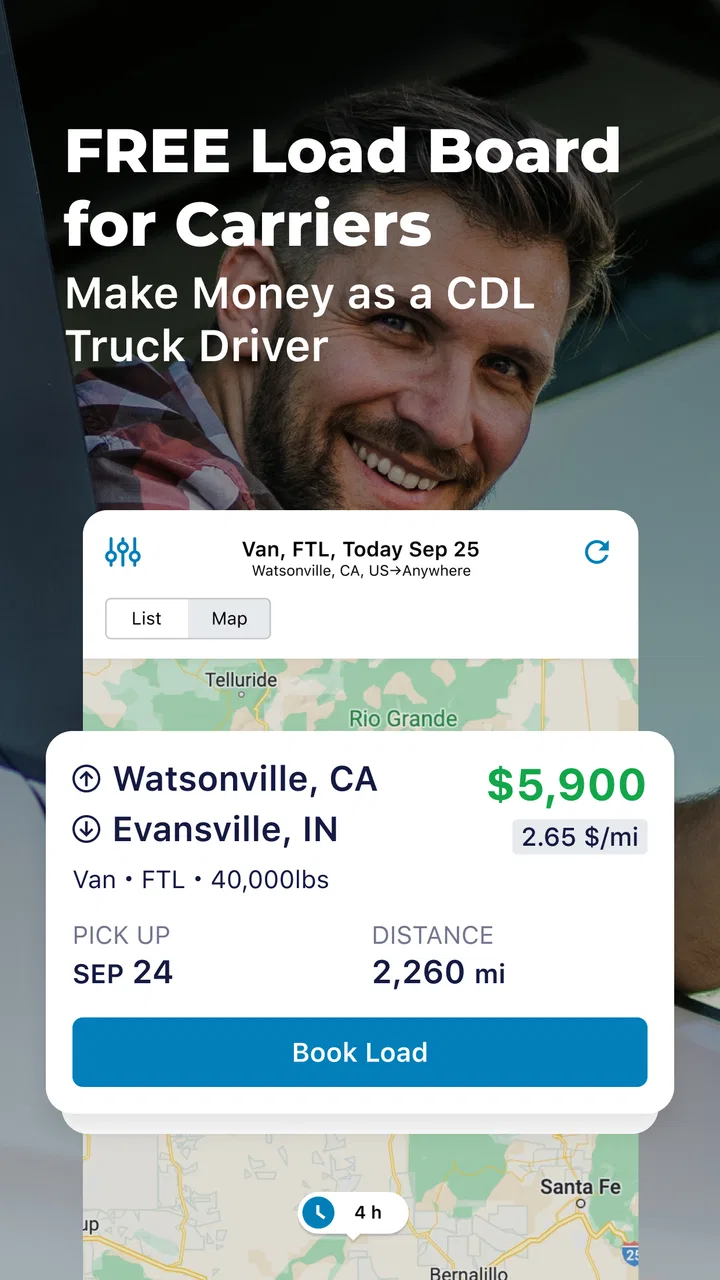
Trucker Path Load Board
- 4.3
- Rating
- 500.00K
- Installs
- Free
- Price

 Analysis by App-foxy
Finding the right load is only part of the work for a truck driver or freight dispatcher. The harder part is often keeping route planning, available freight, fuel decisions, and timing in view at the same time. Trucker Path Load Board is built for that working reality rather than for ordinary car navigation. I found it most useful as a practical starting point for organizing freight decisions, especially when I wanted to compare opportunities before committing to a trip.
Trucker Path Load Board is a free Maps & Navigation app from Trucker Path for Android users. It is aimed at truck drivers and freight dispatchers who need a way to look for loads and manage the early stages of a haul. The app is rated for Everyone, so its intended audience is broad, although its usefulness is clearly concentrated among people who work with commercial trucking.
The app has been available since June 30, 2015, and its current version is 4.1.0. It has passed 500 thousand installs, with an average rating of 4.3 from roughly 8 thousand ratings and about 3 thousand written reviews. Those figures suggest a product with a real working audience, but I would still treat it as a tool to support judgement rather than as an automatic answer to every freight decision.
You May Also Like

 Blood Strike: 2.5 Anniversary
Blood Strike’s Loadouts Turn Every Drop Into a Tactical Gamble
A close look at Blood Strike’s custom loadouts: how fast access to signature weapons reshapes its battle royale rhythm, rewards preparation, and narrows the gap between fights.

 Pandora - Music & Podcasts
Pandora’s Music Is Easy to Start, but Harder to Recover
Pandora’s strength is its low-effort path from a seed to a station. Its weak spot is how much confidence it asks you to place in connection, setup, and quiet recovery.

 8 Ball Pool
 Is Built on Rivalries, Rematches, and Routine
A close look at the rivalries, rematches, shared routines, and unanswered safety questions that turn a quick pool match into a persistent mobile community.

 Samsung Music
’s Quiet Strength Is Playing What You Already Own
Its reach comes less from spectacle than from dependable access to a personal library. That simplicity is both the app’s strongest retention engine and its ceiling.

 AccuWeather: Weather Radar
AccuWeather Review: A Quick, Clear Forecast for Everyday Decisions
For everyday plans, the best forecast is the one you can understand quickly. AccuWeather makes rain timing, radar, and local conditions easy to act on, with a few trade-offs.

 Hill Climb Racing
Why Hill Climb Racing Still Turns Crashes Into One More Run
A tiny car, a bumpy hill and one more upgrade: Hill Climb Racing keeps resurfacing because its simple chaos makes every near-miss feel personal.
More From Our News Desk



Getting from installation to a useful first load search
I’d begin by treating the first search as a test of your real workflow, not a hunt for the most attractive listing. Have the truck’s location, available equipment, timing, and preferred direction in mind before opening the board; then you can tell whether the results are genuinely useful or merely plentiful. That small preparation also makes it easier to decide what to verify before moving on to the next step.
What the app feels like when you begin
The first thing to understand is that this is not simply another road map with a truck icon placed on top. Its purpose is closer to a freight workspace: the main question is not only “How do I get there?” but also “What work makes sense for this truck and this direction?” That difference affects how I used it. I did not open it expecting a complete replacement for every navigation, dispatch, or accounting tool. I opened it when I needed to think through the next move.
For a driver, that next move might be finding a load after a delivery, checking whether an empty repositioning trip could lead toward a better market, or preparing questions for a dispatcher. For a dispatcher, the same information can help frame a conversation with a driver before offering a load. The value is in reducing the amount of scattered searching that happens before a decision.
The free entry point is helpful for someone testing a new workflow. You can see whether the app fits your working habits without first treating it as a major purchase. There are in-app purchases ranging from less than a dollar to several hundred dollars per item, so I would pay attention to any upgrade or purchase screen and decide whether the added value matches the way you actually work. A casual user should not assume that every available capability belongs in the basic experience.
One important expectation is that a load board does not remove the need to verify details. A promising listing still needs a careful check of pickup and delivery timing, equipment requirements, distance, rate, detention terms, and the broker or shipper relationship. I used the app as a place to narrow the field, not as permission to accept the first attractive option.
Setting up a useful working routine
My advice for a first-time user is to begin with one realistic trip rather than trying to understand every part of the app at once. Think about the truck’s current location, the direction you want to travel, the equipment you can actually provide, and the time available before the next appointment. That simple preparation makes the results more meaningful than browsing without a clear plan.
If you are a driver, keep your actual situation in front of you while searching. A load that looks good from a distance may become poor once you account for the empty miles needed to reach pickup, a difficult appointment window, or a destination that leaves you far from the next useful market. If you dispatch, use the same discipline before sending an option to a driver. The app can help you discover possibilities, but it cannot know every operational constraint unless you actively apply it.
A useful habit is to separate “possible” from “ready to book.” During the first pass, collect a small group of loads that appear to fit. During the second pass, compare them against the truck’s real position, hours, equipment, and preferred lane. This two-stage approach is more reliable than making a booking decision while distracted by every new result.
I also recommend keeping a short note outside the search itself with the questions you need answered. For example: Is the pickup appointment firm? Is the commodity compatible with the trailer? Are there special loading instructions? What happens if the receiver delays unloading? This prevents the convenience of an in-app search from making you skip the less exciting but more important verification work.
How to reach the first meaningful success
For me, a successful first session would not be simply opening a load card. It would be finding one plausible option and understanding why it fits. Start by searching around the truck’s current area or the area where the truck will become empty. Then narrow your attention to loads that match the equipment and direction rather than chasing the highest-looking number.
Once you find a candidate, compare the trip as a whole. Look at the empty movement to pickup, the loaded distance, the delivery timing, and what the destination means for the following day. A load can be workable even if it is not the closest one, while a nearby load can be a poor choice if it creates a long unpaid repositioning move afterward. This is one of the less obvious ways to use a load board: judge the opportunity as a sequence of moves, not as a single line in a list.
For a dispatcher, the first useful result may be a better call with the driver. Instead of saying only that a load is available, you can discuss why it fits the truck’s current plan and what must be confirmed before booking. For an owner-operator, the result may be a shortlist that makes rate negotiation more focused. For a company driver, it may simply be a clearer understanding of what the next assignment involves.
Before treating a load as accepted, write down the key facts in your normal record-keeping system. I would not rely on memory after a busy search. The app is valuable at the discovery stage, but a professional workflow still needs a dependable place for confirmations, contact names, appointment times, and agreed terms.
Where new users can become confused
The most common confusion is mixing the load-search function with full truck navigation. A freight-focused app can help you decide which work is attractive, but that does not mean it should be your only source for turn-by-turn driving decisions. Commercial vehicles have restrictions involving height, weight, road classifications, and access points. I would use a navigation tool designed for the specific vehicle when the route itself matters, then use the load board to support the freight decision.
Another point of confusion is the difference between seeing an opportunity and having a confirmed booking. A listing is a lead until the relevant details are checked and the load is actually secured through the proper process. If a result appears ideal, slow down rather than speeding up. Confirm the commodity, equipment, schedule, locations, and payment terms before changing your plan.
Search results can also encourage a narrow view of profitability. The visible rate is only one part of the calculation. Empty miles, tolls, fuel, waiting time, deadhead after delivery, and the likelihood of finding the next load all affect the real outcome. I found the app more useful when I treated it as a comparison screen and did the broader calculation myself.
New users may also wonder whether the app is suitable for someone who does not drive professionally. Technically, the Everyone rating makes it accessible, but the practical answer is different: most of its value depends on understanding freight operations. A private driver planning a vacation will probably get more from a standard navigation app. A dispatcher, carrier, owner-operator, or truck driver is much closer to the intended use.
Small workflow improvements that make a difference
One useful technique is to search before the truck is empty, not only after delivery. If I wait until the last minute, I am more likely to accept a weak option because the pressure feels immediate. A short early search gives me time to compare destinations and prepare questions. It also makes it easier to notice whether the next load would pull the truck away from the area where I actually want to work.
A second technique is to use the app for direction planning rather than only local availability. Suppose a truck is finishing in one market and the next preferred area is several hours away. I would compare loads that move toward that area with loads that pay more but leave the truck in an inconvenient position. This is where a load board becomes a planning tool instead of a list of tempting offers.
A third is to create a personal rejection rule. For example, I might reject any candidate that requires equipment I do not have, creates an unrealistic appointment sequence, or leaves too many unanswered questions. The exact rule will differ by operation, but the principle is valuable: decide the deal-breakers before the search becomes emotional. That keeps a high-looking rate from overpowering common sense.
For dispatchers, another practical improvement is to present drivers with two or three reasoned choices instead of forwarding every possibility. A driver needs enough information to make a safe and profitable decision, not a flood of loosely matched listings. Filtering before sharing saves time on both sides and makes the app part of a conversation rather than another source of noise.
How it compares with familiar alternatives
Compared with a general navigation app, Trucker Path Load Board is more relevant when the central problem is finding freight rather than simply reaching an address. A normal map may be excellent for directions, traffic, and places, but it does not replace a freight search workflow. If your day begins with “Where should this truck go next?” this app is closer to the question you need to answer.
Compared with calling contacts or searching several unrelated sources manually, a dedicated load board can give the process more structure. The trade-off is that structured results can feel deceptively complete. Personal relationships, broker reliability, lane knowledge, and current market judgement still matter. I would not abandon trusted contacts just because an app offers a convenient search screen.
Compared with a full transportation management system, this app is more approachable for a smaller operation or an individual who needs load discovery without adopting a large administrative platform. A larger carrier may still need separate systems for dispatch records, compliance, invoicing, maintenance, and communication. The app can fit into that environment, but it should not be mistaken for the entire back office.
Its strongest position is therefore practical and specific: it gives a driver or dispatcher a focused place to begin looking for the next freight opportunity. It is less convincing as a universal replacement for navigation, financial analysis, or professional dispatch infrastructure.
Who should use it and who should skip it
I would recommend trying it if you are an owner-operator who regularly needs to find your next load, a dispatcher supporting a small fleet, or a driver who wants a more organized way to discuss available freight. It is especially useful when you need to compare direction, timing, and equipment fit before making a call.
I would be more cautious if you already have a highly efficient dispatch system that supplies verified loads and handles the surrounding paperwork. In that situation, another search tool may add duplication rather than value. It may also be the wrong choice if you expect an app to calculate your true profit automatically or guarantee that every listing is suitable.
Drivers who mainly want turn-by-turn directions should choose a tool built around truck-safe routing. Likewise, someone who only hauls occasionally may find the freight terminology and decision process unnecessary. The app makes the most sense when load selection is a recurring part of your work, not a one-time curiosity.
My recommendation after using it
Trucker Path Load Board earns its place as a practical starting point for truck freight searches. I like that it focuses attention on the next business decision instead of treating trucking as ordinary point-to-point travel. The free price makes it easy to test, and the established presence of Trucker Path, along with its 4.3 average and more than 500 thousand installs, gives it enough user history to take seriously.
Still, the app rewards careful users. Its results should be checked, compared, and connected to the wider trip plan. The most successful workflow is not “open the app, choose the biggest number, and drive.” It is “search early, filter honestly, verify the details, calculate the whole move, and then book through the proper channel.” That distinction is the difference between browsing freight and making a sound operating decision.
If you are installing it for the first time, begin with the truck’s real location and the next practical destination. Find one candidate that fits your equipment and schedule, list the questions that remain, and use the result to guide a conversation with the broker, dispatcher, or driver. Once that process feels natural, expand into comparing lanes and planning the move after delivery.
My final view is positive, with a clear qualification: this is a useful freight-discovery companion, not a substitute for professional judgement. For the right user, it can turn an unstructured search into a more deliberate routine. For someone seeking ordinary navigation or a complete transportation management system, another option will be a better fit. If your daily work involves deciding what load should come next, however, it is worth testing and judging by how much time and uncertainty it removes from your actual workflow.
FAQs for Trucker Path Load Board
01What is Trucker Path Load Board?
Trucker Path Load Board is a mobile application designed for truck drivers and logistics professionals. It provides real-time access to a vast network of freight loads, helping drivers find and book jobs that suit their routes and schedules. The app aims to streamline the process of load matching and improve efficiency.
02How does Trucker Path Load Board work?
The app connects truck drivers with shippers and brokers by listing available loads. Users can search for loads based on location, type, and other criteria. Once a suitable load is found, drivers can book it directly through the app. The app also provides additional features like route planning and fuel station locations.
03Is Trucker Path Load Board free to use?
Trucker Path Load Board offers both free and premium versions. The free version provides basic access to load listings and essential features. The premium version, available through a subscription, offers enhanced functionalities such as advanced search filters, priority support, and detailed analytics to optimize your trucking business.
04What are the main features of Trucker Path Load Board?
The app includes features like real-time load matching, GPS navigation, and a comprehensive database of truck stops and fuel stations. Users can also access reviews and ratings of shippers and brokers, ensuring reliable partnerships. The load board is continuously updated to provide the most current opportunities available.
05Can Trucker Path Load Board be used internationally?
Trucker Path Load Board primarily focuses on the United States market. While some features may be accessible in other countries, the app is optimized for U.S.-based trucking routes and regulations. It's advisable to check the app's compatibility and available services in your specific region before use.
Pros
- User-friendly interface for easy navigation.
- Real-time updates on available loads.
- Comprehensive truck stop information.
- Secure and reliable payment options.
- Wide network of freight opportunities.
Cons
- Limited features in free version.
- Occasional app crashes reported.
- Requires stable internet connection.
- Some ads can be intrusive.
- Limited customer support options.

Trucker Path Load Board
Gallery